Free Resources



Office Applications Resources
From instant, accurate replication of account numbers, names, and addresses, to reliable single key access of imbedded menu functions, X-keys are ideal for maximizing efficiency in office applications.
From Cut, Copy, Paste, Save, and Undo to “Launch Word and Open the Last Document”, the X-keys can make your work faster and more enjoyable.
See more ways to boost your efficency with the X-keys here: windows.php
X-keys for MS Word
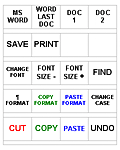
While they may seem incredibly simple, the shortcuts on this X-keys will quickly become second nature to your fingers and you'll find yourself speeding through Word as you never have before.
These shortcuts are easy enough to program key by key, but we have the X-keys SE file here (msword.xk1) and the legend here (xklmsword.doc) if you want them.
- Programmed Shortcuts on the X-keys Desktop for Word
- Win+R winword Enter (Launch Word)
- Win+R winword Enter Alt+F 1 (Launch Word, Open Last Doc)
- Alt+W 1 (switch to doc. 1)
- Alt+W 2 (switch to doc. 2)
- Ctrl+S (save)
- Ctrl+P (print)
- (Open for your customization)
- (Open for your customization)
- Ctrl+D (change font)
- Ctrl+[ (decrease font size)
- Ctrl+] (increase font size)
- Ctrl+F (find)
- Alt+O P
- (paragraph format) Shift+Ctrl+C (copy format)
- Shift+Ctrl+V (paste format)
- Shift+F3 (chance case)
- Ctrl+X (cut)
- Ctrl+C (copy)
- Ctrl+V (paste)
- Ctrl+Z (undo)
X-keys Windows Companion

Perform your most often used Windows functions with the touch of a button.
Download the legend template here: XKLwincomp.doc
Download the X-keys SE profile here: WINcompanion.xk1
Accessories | Developer´s Corner | Resources | Support
Shopping Cart | Checkout | Privacy Policy | Site Map
X-keys, Y-mouse, RailDriver and The No Slogan Company are Trademarks of P.I. Engineering, Inc.
Copyright © 2006 P.I. Engineering, Inc. All Rights Reserved.
101 Innovation Parkway
Williamston, MI U.S.A. 48895
1-517-655-5523
FAX: 1-517-655-4926
www.piengineering.com | www.xkeys.com | www.ymouse.com | www.raildriver.com
Visit Our New Divisions: