Free Resources



CAD Professional´s Resources
If you have a CAD layout or template you would like to share with us, please contact us: [email protected]
AutoCAD
A blank template for AutoCAD
Open this DWG file, type your text or add your symbols to the keys and print a custom legend to fit the precut sheet which came with your X-keys. Download it here: x-keyslegend.dwg
- Printing tips:
- Add your text and symbols on a separate layer and turn off the key outline layer before printing
- Make test prints on plain paper before printing on your legend sheet.
Additional legend sheets are available in our online store.
Relative Coordinate Entry Pad
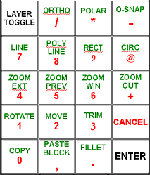
Our AutoCAD aficionado used the red layer of an X-keys Desktop to create this custom numbers pad for relative coordinate entry (because nothing is absolute!). Grouping the "@" and comma keys with the numbers improves the ergonomics of this system and eliminates the finger gymnastics of Shift+2 every time you start relative coordinate entry. The green layer features commonly used standard functions. Download the legend file here: acad20key.dwg (44 KB)
DataCAD
X-keys Professional DataCAD Keyboard
“I have been using both flavors of X-keys for several years now with DataCad. I find them absolutely indispensable.” -- Harry Korshak
Invoke frequently used commands and macros from an X-keys Professional Keyboard with the single touch of a key. This X-keys layout makes DataCAD fly and it is only an example of what may be done. DataCAD users can easily program favorite macros and template files into keys grouped in the way which makes the most sense to them.
Download the tutorial and get the table of codes we used here: datacadxkeys.pdf (118 KB)
Get the DataCAD legend file for printing or editing here: xkeylegend.dc5 (240 KB)
Get DataCAD's list of keyboard shortcuts to help with your programming here: dcadshortcuts.pdf (8 KB)
DesignCAD
Click on the image to get a better view of our DesignCAD layout.
A great resource for DesignCAD is Steve Barnes' DesignCAD Unleashed site: designcadunleashed.com
Protel
This X-keys layout for Protel was generously provided and beautifully packaged by Cliff Huston of Propeller Head Design (E-mail: [email protected]). His PDF file includes key legends, a print ready overlay for commands on the second layer, a list of the Protel Shortcut keys he's programmed into the X-keys, and tips for using the template as well as the X-keys.
Download the package here: protelxkey.pdf (97 KB)
Create your own X-keys template by Cliff Huston. This self-extracting zip file contains Protel database files which allow you to open and modify the template in Protel: x-keystemplate.exe (136 KB)
This file contains notes on using the Protel database file above: protelxkdbb.pdf (38 KB)
Protel Keyboard Shortcuts
From Protel Help Files.
- The Shortcuts are divided into seven sections:
- PCB Editing Shortcuts
- PCB Keyboard Shortcuts
- PCB Special Mode Dependent Keys
- Shortcuts to Speed the Routing Process
- Default Schematic Menu Shortcut Keys
- Default Schematic Shortcut Keys
- Frequently used Keyboard Shortcut Key Combinations
We've compiled them all here in one logically arranged pdf: protelkeyboardshortcuts.pdf (21 KB)
Accessories | Developer´s Corner | Resources | Support
Shopping Cart | Checkout | Privacy Policy | Site Map
X-keys, Y-mouse, RailDriver and The No Slogan Company are Trademarks of P.I. Engineering, Inc.
Copyright © 2006 P.I. Engineering, Inc. All Rights Reserved.
101 Innovation Parkway
Williamston, MI U.S.A. 48895
1-517-655-5523
FAX: 1-517-655-4926
www.piengineering.com | www.xkeys.com | www.ymouse.com | www.raildriver.com
Visit Our New Divisions: